Wilmot Computer Solutions Logo
CALL US
224-484-0456
1366 Angle Tarn
West Dundee, IL 60118
  • Home
  • About
  • Services
  • Blog
  • Contact
  • Forms & Info
  • VoIP
  • Book Appointment
  • Customer Portal

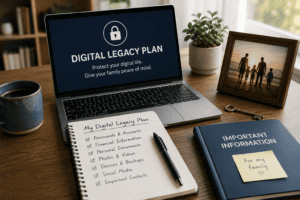
Everyone Needs a Digital Legacy Plan

July 29, 2026 by Thomas Wilmot

Protect What Matters Most—Even When You Can’t

Most people have a will, life insurance, or a folder with important financial documents. But what about everything that exists online?

Today, our digital lives are just as important as our physical ones. Family photos, email accounts, online banking, passwords, cloud storage, social media, business documents, and even our smartphones contain information our loved ones may need one day.

Unfortunately, many families discover too late that they have no way to access these important accounts. The result can be unnecessary stress, lost memories, delayed financial matters, and countless hours trying to recover access.

A Digital Legacy Plan helps prevent that.

What Is a Digital Legacy Plan?

A Digital Legacy Plan is a secure way to organize your important digital information so a trusted person can access it if you’re unable to.

While many people think this only applies after someone passes away, it’s just as valuable during situations such as:

  • A medical emergency
  • A serious illness or hospitalization
  • A temporary disability
  • Memory loss
  • Extended travel
  • Any event that prevents you from managing your own accounts

Having a plan means your family can focus on what matters instead of struggling to unlock devices or recover passwords.

What Should Be Included?

Every person’s plan will be different, but here are some important items to consider:

  • Primary and recovery email accounts
  • Online banking and investment accounts
  • Credit card accounts
  • Password manager information
  • Computer usernames and passwords
  • Mobile phone passcodes
  • Cloud storage (OneDrive, Google Drive, iCloud, Dropbox)
  • Family photos and videos
  • Important documents
  • Social media accounts
  • Two-factor authentication recovery codes
  • Websites and domain registrations
  • Business accounts and software subscriptions
  • Cryptocurrency wallet information (if applicable)

Don’t Just Write Your Passwords Down

One of the biggest mistakes people make is creating a notebook or spreadsheet containing every password.

If that document is lost or stolen, it could expose your entire digital life.

Instead, consider using a reputable password manager such as Bitwarden. Password managers securely store your credentials using strong encryption and allow you to create unique passwords for every account.

Many also offer emergency access features that allow a trusted family member to gain access when appropriate.

Choose Someone You Trust

Your Digital Legacy Plan is only useful if someone knows it exists.

Choose one or two trusted people and make sure they know:

  • Where your plan is stored
  • How to access it if necessary
  • Who should be contacted first
  • Any special instructions regarding your accounts

Review your plan once a year or whenever you make significant changes to your accounts or devices.

Take Advantage of Built-In Legacy Features

Many companies already provide tools to help protect your digital legacy.

Some examples include:

  • Apple Legacy Contact
  • Google Inactive Account Manager
  • Facebook Memorialization Settings
  • Microsoft Account Recovery Options

These features can make the transition much easier for your family when they’re needed.

Peace of Mind Is the Real Benefit

Creating a Digital Legacy Plan isn’t about expecting the worst.

It’s about making life easier for the people you care about.

A few hours of planning today can save your family days—or even weeks—of frustration during an already difficult time.

Whether it’s accessing treasured family photos, paying important bills, or managing your business, being prepared provides peace of mind for everyone involved.

Need Help Getting Started?

At Wilmot Computer Solutions, we help individuals and families organize and secure their digital lives.

We can help you:

  • Set up a secure password manager
  • Organize important digital accounts
  • Configure secure cloud backups
  • Enable multi-factor authentication
  • Create a personalized Digital Legacy Plan
  • Review your cybersecurity and account security

Technology should make life easier—not leave your loved ones guessing.

If you’d like help creating your own Digital Legacy Plan, contact Wilmot Computer Solutions today. We’re here to help you protect what matters most.

Filed Under: cybersecurity Tagged With: Bitwarden, Cybersecurity, Data Backup, Digital Estate Planning, Digital Legacy Plan, Family Technology, Online Safety, Password Manager, Password Security, Two-Factor Authentication

Share:

Are Password Managers Worth It?

June 29, 2026 by Thomas Wilmot

Why I Recommend Bitwarden to My Customers

By Tom Wilmot | Wilmot Computer Solutions

Computer security researcher Steve Gibson has long emphasized that one of the foundations of good cybersecurity is using passwords that are long, strong, unique, and managed by software instead of trying to remember them yourself.

It’s simple advice, but it’s some of the best cybersecurity advice you’ll ever hear.

If you’re like most people, you probably have dozens—or even hundreds—of online accounts. Email, online banking, Amazon, Facebook, Netflix, healthcare portals, Microsoft, Google… the list keeps growing.

Yet many people still use the same password for multiple websites or choose passwords that are easy to remember. While that may seem convenient, it’s also one of the biggest mistakes you can make when it comes to protecting your online identity.

Fortunately, there’s an easy solution.


Why Reusing Passwords Is Dangerous

Imagine one of your favorite websites experiences a data breach.

If you’ve used that same password for your email account, online banking, or other important websites, criminals may try that password everywhere else.

This is known as credential stuffing, and it has become one of the most common ways cybercriminals gain access to online accounts.

Even if your password is strong, reusing it across multiple websites creates unnecessary risk.

The safest approach is simple:

Every online account should have its own unique password.

The challenge, of course, is remembering them all.


What Is a Password Manager?

A password manager securely stores all of your usernames and passwords inside an encrypted digital vault.

Instead of trying to remember dozens or even hundreds of passwords, you only need to remember one strong master password.

Your password manager can:

  • Generate long, random passwords
  • Save usernames and passwords securely
  • Automatically fill in login information
  • Sync securely between your computer, phone, and tablet
  • Alert you to weak or reused passwords

Instead of making life more complicated, a password manager actually makes logging in easier.


Why I Recommend Bitwarden

After researching and using several password managers over the years, Bitwarden is the one I personally use and recommend to my customers.

Here’s why:

✅ Excellent security with end-to-end encryption

✅ Available on Windows, Mac, Linux, iPhone, Android, and virtually every major browser

✅ Secure synchronization across all of your devices

✅ Strong password generator

✅ Ability to securely store notes, credit cards, and other sensitive information

✅ Easy to use

✅ Excellent free version for most users

For many people, the free version is all they’ll ever need.


What About Saving Passwords in My Browser?

Browsers like Microsoft Edge, Google Chrome, and Safari have improved significantly over the years and offer built-in password saving.

While that’s certainly better than reusing passwords or writing them on sticky notes, a dedicated password manager offers several advantages.

With Bitwarden, your passwords aren’t tied to one browser or one operating system.

Whether you’re using Windows, a Mac, an iPhone, an Android phone, or multiple browsers, your passwords stay with you.

A dedicated password manager also provides better organization, stronger password generation, password health reports, and more flexibility as your needs grow.


Don’t Forget Multi-Factor Authentication (MFA)

A password manager is one of the best investments you can make in your online security—but it shouldn’t be your only layer of protection.

Whenever it’s available, enable Multi-Factor Authentication (MFA) on important accounts such as:

  • Email
  • Banking
  • Microsoft 365
  • Google
  • Apple ID
  • Social media
  • Your Bitwarden account

Even if someone somehow obtains your password, MFA adds another layer of security that can stop unauthorized access.


A Few Password Tips

Here are a few simple habits that can dramatically improve your security:

  • Never reuse passwords.
  • Make every password unique.
  • Use a password manager to generate passwords.
  • Enable MFA whenever possible.
  • Don’t share passwords through email or text messages.
  • Keep your recovery email and phone number up to date.

Small changes like these can significantly reduce your risk of becoming a victim of cybercrime.


My Final Thoughts

One of the questions I hear most often is:

“Are password managers really worth it?”

My answer is simple.

Absolutely.

A password manager makes it easier to use stronger passwords, eliminates the frustration of remembering them, and greatly improves your online security.

That’s why Bitwarden is the password manager I personally use and confidently recommend to my customers.


Need Help Getting Started?

If you’d like help setting up Bitwarden, importing your existing passwords, or improving your online security, I’d be happy to help.

At Wilmot Computer Solutions, I can help you:

  • Install and configure Bitwarden
  • Import passwords from your browser
  • Organize your password vault
  • Enable Multi-Factor Authentication (MFA)
  • Review your overall password security

Sometimes, spending just a few minutes improving your password habits today can prevent hours—or even days—of frustration later.


About Wilmot Computer Solutions

Wilmot Computer Solutions provides managed IT services, cybersecurity, computer repair, backup solutions, and technology support for residential customers and small businesses throughout the northwest suburbs of Chicago.

Reliable IT. Proactive Protection. Peace of Mind.

🌐 https://WilmotCS.com

📞 224-484-0456

📧 Tom@WilmotCS.com

Filed Under: cybersecurity Tagged With: Bitwarden, Cybersecurity, Data Protection, Identity Theft, MFA, Password Manager, Password Security, Residential IT, Small Business IT, Two-Factor Authentication, Wilmot Computer Solutions

Share:

Wilmot Computer Solutions

224-484-0456
1366 Angle Tarn
West Dundee, IL 60118

Copyright © 2026 · Wilmot Computer Solutions · 1366 Angle Tarn, West Dundee, IL 60118